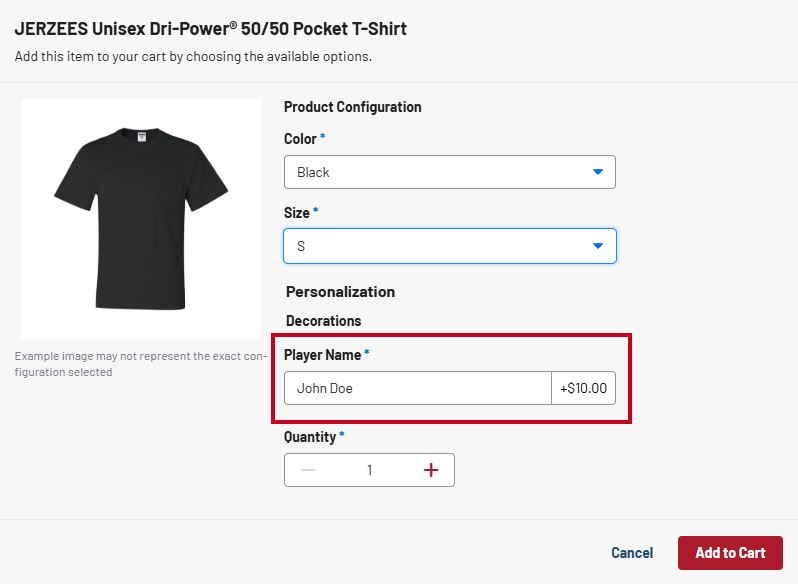
On ESP+ Stores you can create a personalization as part of a decoration and add a personalization charge.
To access the personalization, go to the Products tab of the store and click on Decorations in the left menu. then, click on Create Decoration.
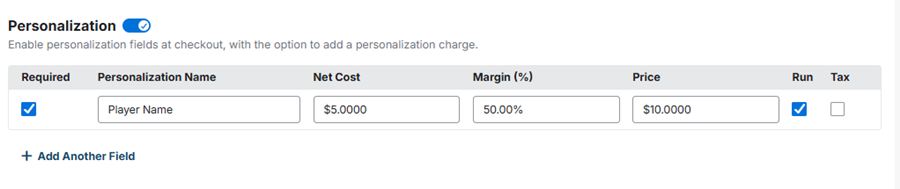
To create the personalization, toggle the Personalization to "on".
Choose whether the personalization is required, meaning the customer will need to choose this at the Store checkout. Enter the personalization name, then add the net cost, margin, and/or price if you are charging for the personalization. You can also choose whether this is a run charge and whether you want to charge tax on the personalization.
Next, click on "Add Products" and select the products in the store that will include this personalization.
When you are done, click Create Decoration to save the personalization.
At the Store checkout, the customer will see the personalization field and charge when adding the product to their shopping cart.